
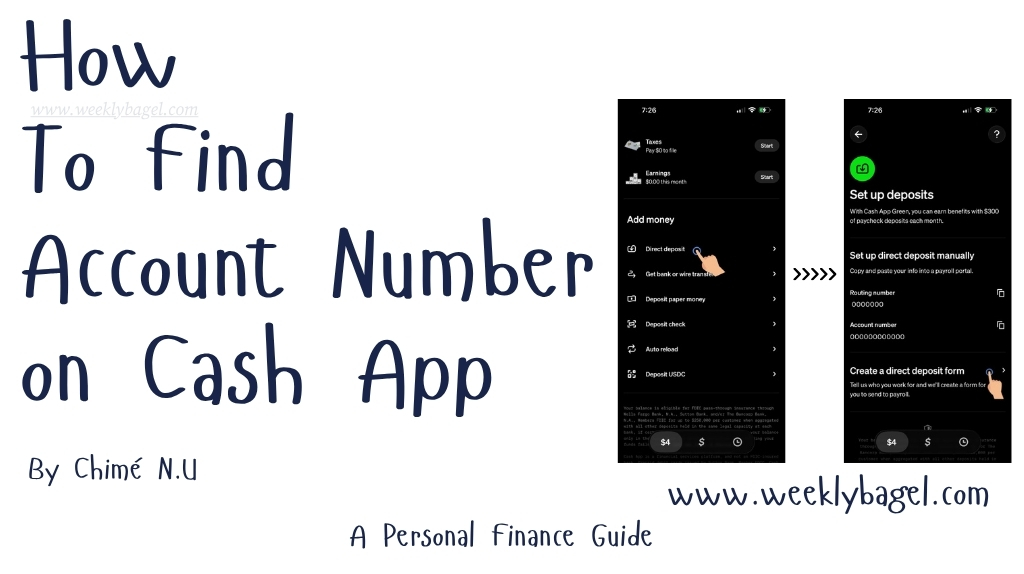
If you are an avid reader of mine, you will realize by now I am a sucker for fin techs. Personally, I think Fin techs and online banks are future of banking. You can easily set up a direct deposit with a fin tech like Cash App. One of the ways you could do this, is to find your account number on Cash App to fill your HR deposit form.
Speaking of the future of banking, Cash App is really making life easy for my generation and adult Gen Zs. I am not particularly enthusiastic about driving to banks to get a void check for a direct deposit. Are you?
Hence, we could just use our Cash App account and routing number to fill out a payroll form or receive incoming wires. There are two ways you could go about finding your routing number. You either do it through the app, or just login on the website. I will walk you through how you could do it on the app.
How To Find Routing & Account Number On Cash App
You can find your routing and account numbers on Cash App by doing the following below:
- Login to your Cash App account.
- Tap on the $money sign on the bottom left of the app.
- Scroll down, until you see Add money section.
- Under the Add money section, tap on Direct deposit.
After the above, we are shown the routing and account numbers. All we have to do is to copy and paste the information on our HR direct deposit form or put them on our job’s online payroll portal. Whenever it is payday, the paycheck goes into the Cash App accounts.
The same goes with using these numbers for bank transfers.
Alternatively, Cash App can just design a direct deposit form for you to print and give any hiring department. If you ask me, I say I prefer this one to just individually writing my routing and account numbers on a form. I do not know about you, but I am a little dyslexic sometimes.
What this means is it is possible for me to miss a digit or write a wrong number. Hence, why I prefer Cash App creating the form with the routing and account numbers on it. That way, I can just turn in to my job’s HR department or give it to whomever wants to do a bank wire using the numbers.
How Do I Set Up A Cash App Direct Deposit Authorization Form
Anyways, below is how I want you to go about creating a Cash App direct deposit form with your account and routing numbers.
- Login to Cash App.
- Go to Direct deposit under the Add money section as I directed earlier.
- Scroll down past the routing and account number until you see Create a direct deposit form. Tap on it. Cash App will ask you to write the company you work for. Type it and tap on Next.
- You will be asked to confirm your info before the Fin tech creates your form. You get to edit Name, Company Name and Paycheck amount or percentage you want deposited into your account. There is an option to E-sign this direct deposit form.
- Tap on Create form to finishing creating it.
The form is created. You can either download it, or have it emailed to yourself and the company. The form will contain your name, the date of form creation, how much you want coming through the direct deposit and routing/account numbers. Basically, everything needed for a direct deposit.
On the whole, I want you to know our routing and account numbers are not just for direct deposit alone. We can use them to send or receive money to and from a bank. Oh yeah!
Remember what I said earlier about Fin techs, my dear reader?
This is what I meant, when I said they are a part of thes future of banking. At least, they are here to stay due to the convenience they offer to young working class adults. This is whether we are in the gig economy or just want a good old bank wire and transfer on our phones.
Limits To What We Can Deposit By Bank Wire On Cash App
On Cash App Limits You Must Know article, I talked about there are limits to transactions the fin tech allows. If you are using your Cash App routing and account numbers for a direct deposit, there is a limit of $50,000 per day. If you ever expect an amount of this sort, I would advise using a good online or traditional bank.
Not that Cash App has got what it takes, but I prefer being able to talk to people when things go wrong.
Additionally, there is a limit to receiving a wire transfer using your account and routing number. It is $50,000 a day, but we can only get two wires per week and four wires per month. I just thought you might want to know, so you know how much you could receive by wire.
Alternatives To Cash App Routing And Account Numbers
Although Cash App provides routing and account numbers to supplement its limited banking service, I still think it has a lot of catching up to do with pure online banks. This is because it is a fin tech at the end of the day with limited banking features. We cannot get a check book, a big loan or access to a credit limit with it.
So, what is the alternative?
Online banks like SoFi is a great alternative. It offers everything Cash App and traditional banks offer plus more. I am recommending it, because it is a finance ecosystem that meets each working class adult’s financial needs. This is from investing, banking services, insurance, student and personal loans to credit and budgeting tools. I actually had my car insurance per month cut from $350 to $156 because SoFi dug around and found me a better deal.
You can open an account with SoFi at no cost to you. If you use my referral link below, you can get up to $475 cash bonus. Firstly, SoFi gives you $50 cash bonus, when you deposit $500 within 21 days of account opening. Also, you get $25 cash bonus when you decide to enroll on SoFi Plus. You only get $400 cash bonus, when you set up a direct deposit with SoFi with a deposit of $5000 within 21 days of account creation.
Open a SoFi Checking and Savings account
Earn up to $475 in cash bonuses!
Editorial notice: This is a referral link. WeeklyBagel may earn a commission at no cost to you. I only refer banks or financial products I have used.
Well, I figured you may want to bank with a good online bank with fin tech-like service and full traditional banking services. In as much as I love Cash App as a fin tech, I feel like SoFi will serve you better in the aspect of direct deposit. You earn 3.10% on savings balances and Vaults, and 0.50% APY on checking balances, with eligible direct deposit according to SoFi.
Anyways, all I said above is how you find your account number on Cash App. If you want to use Cash App for some other financial needs, I recommend reading my guide: How To Use CashApp To Send & Receive Money Instantly. I walk you through the best ways to perform financial services with Cash App.


 How I Add Money On My SoFi Account